- Published on
CWL - Trust Me, Relationship is Malicious
- Authors

- Name
- mfkrypt

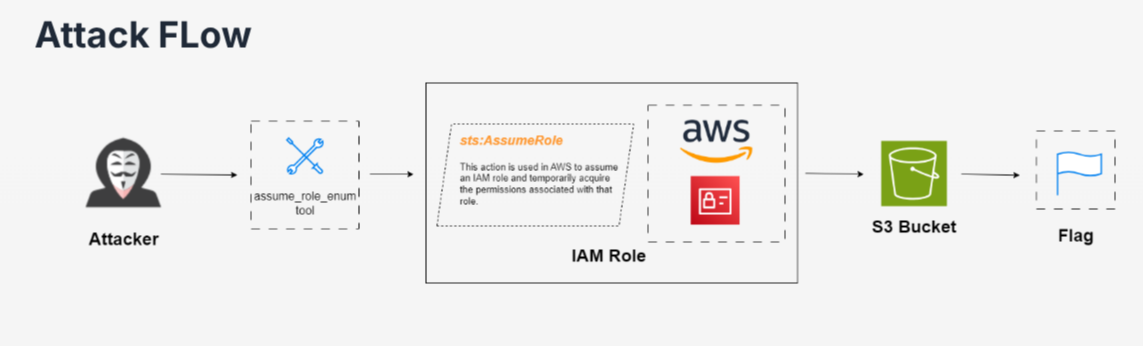
Table of Contents
Staring Point
We are given the following credentials
Proceed to authenticate. We can provide any random region for the region name field
aws configure
Verify the authentication by making an API call
aws sts get-caller-identity
The current user is Backend_Developer
Understanding sts:AssumeRole
As per the attack flow shown at the start, the current user has the sts:AssumeRole permission. We cannot verify this claim because we have no access to permission enumeration.
- What is STS?
AWS Security Token Service (STS) is primarily designed to issue temporary, limited-privilege credentials. These credentials can be requested for AWS Identity and Access Management (IAM) users or for authenticated users
- What is AssumeRole?
An action provided by STS that permits a principal to acquire credentials for another principal, essentially impersonating them. It responds with an access key ID, a secret key, and a session token corresponding to the specified ARN
An example of the AssumeRole logic would be the following:
{
  "Version": "2012-10-17",
  "Statement": [
    {
      "Effect": "Allow",
      "Principal": {
        "AWS": "arn:aws:iam::<acc_id>:role/priv-role"
      },
      "Action": "sts:AssumeRole",
      "Condition": {}
    }
  ]
}

# The logic allows the same account user to assume the role `priv-role`
We now have a basic understanding of what this permission can do. The next thing we want to take note of are roles. We want to know what roles we can potentially assume and move laterally from there but the problem is our current user is not able to list down IAM roles due to insufficient access. Therefore, the solution will be to bruteforce the roles from a wordlist
Bruteforcing Roles
According to these articles:
- https://rhinosecuritylabs.com/aws/assume-worst-aws-assume-role-enumeration/
- https://rhinosecuritylabs.com/aws/aws-role-enumeration-iam-p2/
There are 2 methods to bruteforce the roles. The 1'st method using the pacu tool and the 2'nd using the assume_role_enum.py script from here which has been deprecated. After some testing, I could only get the 2'nd method to work because the pacu tool requires a role that we don't know to be supplied in the command.
First, we need to supply the profile of the current user, this can be achieved by manually entering the crednetials in this file:
~/.aws/credentials
Then, we need to supply the accouunt ID of the current user which we already know is 058264439561. The full command would be:
python3 assume_role_enum.py --account-id 058264439561 --profile Backend_Developer
Essentially, what this script does is bruteforce available roles from a wordlist and if that role somehow is configured to allow the user account to assume the role itself, it will perform the STS process and return the Access Keys and a SessionToken. In this case, the role is DBAdmin
Impersonating DBAdmin Role
Now that we have acquired the temporary credentials of the DBAdmin role, we can make a new profile from it
Verify by making an API call of the profile
aws sts get-caller-identity --profile DBAdmin
Enumerating Impersonated Role
We can proceed by listing down IAM resources like users, roles, and policies. After further testing, we discover that the role is able to retrieve attached role policies
aws iam list-attached-role-policies --role-name DBAdmin --profile DBAdmin
The attched policy is named Manager_Access_S3, this could be related to S3 buckets. Let us inspect the contents of the policy by getting the version ID first
aws iam get-policy --policy-arn arn:aws:iam::058264439561:policy/Manager_Access_S3 --profile DBAdmin
Now, we can retrieve the contents of the attached policy
aws iam get-policy-version --policy-arn arn:aws:iam::058264439561:policy/Manager_Access_S3 --version-id v3 --profile DBAdmin
The only interesting output is the fact that we can list and download objects from the securecorpstoragebuk S3 bucket
Enumerating S3 Buckets
aws s3 ls securecorpbakstoragebuk --profile DBAdmin
Looks like our flag. Proceed to download it
aws s3 cp s3://securecorpbakstoragebuk/Flag.txt flag.txt --profile DBAdmin